As an Amazon Associate, we earn from qualifying purchases. Some links on this site are affiliate links at no extra cost to you. Our recommendations are based on thorough research and editorial judgment.


How to Avoid Banding and Flicker Under LED Lighting

To avoid banding and flicker under LED lighting, we should manually control our camera settings. Setting the shutter speed to match the light frequency, like 1/60 seconds for 60 Hz, is essential. Maintaining a fixed white balance can help with color consistency. We should also stabilize exposure using a set aperture and ISO. Experimenting with various LED fixtures and utilizing post-production techniques can further mitigate issues. If we explore these points, we’ll gain more insights on optimizing our setups.
Key Takeaways
- Use a mechanical shutter with a shutter speed of 1/60s (for 60Hz) or 1/50s (for 50Hz) to minimize flicker.
- Set your camera to manual mode to control shutter speed, aperture, and ISO for optimal results.
- Keep a fixed white balance to avoid color shifts caused by changing LED lighting conditions.
- Choose LED fixtures with high CRI ratings and reliable dimming circuits to reduce banding and flicker.
- Test different frame rates with your LED lights, aiming for 30 fps or higher for clearer footage.
Understanding Banding and Flicker
Hey there! So, let’s chat about banding and flicker in LED lighting and how they can impact our photos. You know those annoying stripes that can pop up in your images? That’s banding! And flicker? It’s that weird effect where the lights seem to flicker or dim unexpectedly. Both of these issues happen because LED lights turn on and off super quickly, typically at 50 Hz or 60 Hz. If your camera’s frame rate doesn’t sync up with that, it can lead to some frustrating inconsistencies in exposure.
For example, if you’re shooting in a room lit by LED lights at a high ISO setting—let’s say 1600—you might notice banding even more because the noise gets amplified, which isn’t great for your images. A handy trick to reduce these problems is to use a mechanical shutter and adjust your shutter speed to align with the LED’s flicker frequency. This means instead of just snapping away, you can take a moment to set everything correctly, which can lead to much clearer and more vibrant images.
It’s all about finding that balance! Once you nail these settings, you’ll be one step closer to capturing stunning shots without those pesky distractions. So now that we’ve got the technical stuff down, let’s explore some fun ways to experiment with lighting in your photography!
Using cameras with advanced image stabilization technology can further help minimize the visual effects of flicker and banding in your shots.
Importance of Manual Shooting

You know, there’s something really valuable about understanding the importance of manual shooting in photography. When you switch to manual mode, you can take charge of all the key settings like shutter speed, aperture, and ISO. This is especially handy when you’re working with tricky lighting situations, like the flickering of LED lights. For instance, if you set your shutter speed to around 1/60 second, you can sync it up with the flicker rate of those lights, which helps reduce any weird banding in your images.
Another cool thing about manual shooting is the ability to set a fixed white balance. This means your colors will stay consistent, even if the lighting changes. Just imagine you’re shooting indoors during an event, and the lighting shifts from warm to cool. If you have a fixed white balance, those variations won’t throw off your photos. By keeping control over your settings, you’re less likely to face issues that require heavy fixes later in post-production.
Ultimately, manual shooting gives you the freedom to adjust in real-time—it’s like having your own personal toolkit to get the best results possible. Using the right microphone type also plays a crucial role when recording video alongside your photography to ensure professional-grade audio quality in varying environments.
Now, let’s chat about how to effectively master these manual settings as you go along in your photography journey!
Choosing the Right Shutter Speed

Choosing the right shutter speed can really make a difference in capturing clear, high-quality images, especially when you’re shooting under LED lights. If you’re in a place where the electricity is running at 60 Hz, setting your shutter speed to 1/60 of a second is a great idea. This way, you sync up with the light’s flicker cycle, which helps cut down on that annoying banding effect you might see in your photos or videos.
On the flip side, if you’re in a country where the electricity frequency is 50 Hz, your best bet is to set the shutter speed to 1/50 of a second. This will yield smooth results too. You might even want to experiment with longer shutter speeds, as they can capture multiple flicker cycles and help smooth out any banding. Just remember, though, that using shutter speeds that are multiples or fractions of the electrical frequency can actually make things worse, creating inconsistent exposure that might ruin your footage. Additionally, using equipment with advanced stabilization technology can complement your efforts by minimizing jitter and further improving image quality under challenging lighting conditions.
Fixed White Balance for Consistency
You know, when it comes to photography and videography, a fixed white balance can really make a difference, especially when you’re working with LED lights. Instead of leaving it up to automatic white balance, which can be pretty unpredictable, setting a fixed white balance is the way to go for consistent color. This means you won’t get those annoying shifts in color temperature that can mess with your shots.
For instance, if you’re shooting a video indoors with LED lights, a fixed white balance ensures that the colors in your footage remain true to life and don’t start shifting between shots. Imagine filming a scene where the lighting subtly changes just because your camera decided to adjust the white balance automatically; that can be a pain to fix in post-production. Manually setting your white balance beforehand allows you to maintain that stable look throughout, which makes editing a lot smoother.
Plus, having that consistency makes your color grading much easier down the line. If everything has the same baseline color temperature, you can really focus on enhancing the visuals rather than correcting color shifts. So, next time you’re gearing up for a shoot, remember: setting a fixed white balance is your friend in producing high-quality, stable images. It’s one less thing to worry about, allowing you to dive into the creative side of your work with confidence!
Additionally, using reliable storage solutions with durable construction can help keep your batteries organized and ready for consistent performance during shoots.
Controlling Exposure: Aperture and ISO
When we’re working with LED lighting, controlling exposure is key to getting the best image quality. A great way to do this is by setting your aperture to a fixed value. This helps keep your exposure consistent, so you won’t have to worry about those pesky light changes messing up your shots. For example, if you’re shooting a video in a room with LED lights, try using an aperture of f/4. It keeps things steady and sharp.
Another tip is to lower your ISO settings. High ISO levels can make any flickering from the lights stand out more, which can be really distracting in your images. By setting your ISO to a lower number, like 200 or 400, you reduce the chance of banding—a common issue with LED lighting. Remember, it’s all about finding the right balance between your aperture and ISO. So, experiment a bit! Test out different combinations and see what works best for your environment.
Locking in your chosen settings not only helps maintain image quality but also saves you the hassle of extensive edits later on. Once you find that sweet spot, you’re one step closer to capturing stunning shots under those bright LED lights, setting you up well for the next part of your photography journey! Additionally, choosing LED lights with a high Color Rendering Index ensures your images have accurate and vibrant colors even under artificial light.
Recommended Products

SONY USA AUTHORIZED - Includes Full SONY USA WARRANTY | Introducing the Sony Alpha a7S III - a new milestone in sensitivity, speed and image supremacy.

【Full Set Mirror Photo Booth】Equipped with an Intel i5 processor,8GB RAM + 256GB SSD, ensuring smooth operation of the machine. Simply double-click the pre-installed photo software on the Magic Mirror Photo Booth to take photos and print them, or share them via SMS, email, QR code, or directly to Twitter, Facebook, and Instagram. The package includes 2000D DSLR camera, CP1500 printer, 108 sheets of 4x6 photo paper, and 3 color cartridges.Equipped with durable flight case with wheels, 2 sets of fun props, and a red carpet for a premium photo experience.
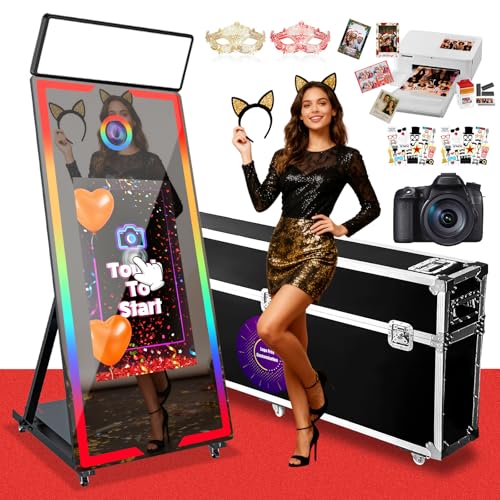
👍【Mirror Photo Booth Built-in PC】Equipped with an Intel i5 processor,8GB RAM + 256GB SSD, ensuring smooth operation of the machine. Simply double-click the pre-installed photo software on the Magic Mirror Photo Booth to take photos and print them, or share them via SMS, email, QR code, or directly to Twitter, Facebook, and Instagram. The package includes a flight case, fun props, masks and a red carpet, creating a premium photo experience.
Exploring Frame Rate Options
When it comes to shooting video under LED lighting, the choice of frame rate can really make a difference in the quality of your final images. For instance, if you shoot at common frame rates like 30 fps, you might run into issues with flicker, especially since many LED lights operate on a 60 Hz cycle. Instead, you could try shooting at 24 fps or 48 fps. These settings can help smooth things out and reduce those pesky exposure inconsistencies.
It’s also worth aligning your shutter speed with your frame rate. For example, if you’re shooting at 50 Hz, setting your shutter speed to 1/50 can help minimize flicker. If you’re feeling adventurous, you might even experiment with higher frame rates, such as 120 fps or 240 fps. These can often outpace the flicker rate of standard LED lights, giving you cleaner footage.
In the end, finding the right frame rate isn’t just about numbers—it’s about getting the look that works for your project. So don’t hesitate to test different settings and see what works best for you! Optimizing frame rate and shutter speed settings can also enhance your camera’s Dual Pixel CMOS AF performance when shooting under challenging light sources.
Testing Different LED Fixtures
Hey there! So, let’s talk about testing different LED fixtures. This is super important if you want to nail high-quality video footage without annoying flicker or banding issues popping up. You know, better LED lights often come with more sophisticated dimming circuits that really help tackle these problems during filming.
One tip is to try out different frame rates—like 24, 30, or even 60 fps—to see what works best with the specific LEDs you’re using. For instance, you might find that shooting at 30 fps with a certain fixture gives you fewer flickering issues. It’s also a good idea to stick to LED lights with a consistent frequency rating, like 50Hz or 60Hz, to keep your exposures steady.
Before you jump into a shoot, it can be really helpful to compare a few brands under controlled conditions. This way, you can see which ones are prone to flicker and banding. Taking notes during these tests is a great habit that can help you refine your lighting setups for future projects. Speaking of setups, let’s chat about how to arrange your lights for the best effects! Additionally, using cameras with high frame rate options can further reduce visible flicker issues, especially under challenging LED lighting.
Recommended Products
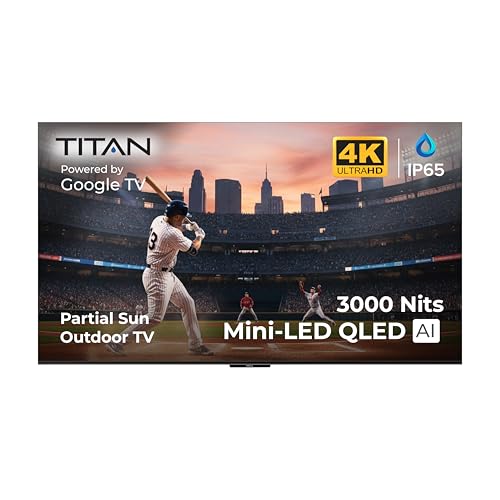
OUTDOOR-READY & WEATHERPROOF DESIGN: Built for patios, decks, and backyard entertainment, this IP65 weatherproof outdoor TV is engineered to withstand rain, dust, humidity, and temperature changes. Advanced protective nanocoating helps safeguard internal components, making it ideal for partial-sun outdoor environments year-round.

QD-MINI LED: TCL's QD-Mini LED combines the merits of QLED and OLED technologies, transforming the traditional backlight into lighting that is close to pixel-level precision.

INTELLIGENT TV PROCESSING – The Cognitive Processor XR understands how humans see to deliver intense contrast with deep blacks, high peak brightness, and natural colors.
Post-Production Solutions
After we’ve experimented with different LED fixtures and gathered some useful insights, let’s chat about how we can tackle issues like banding and flicker during post-production. One handy technique we can use is dynamic masking—basically, it lets us zoom in on the areas that need fixing and apply adjustments where they’re needed, which is great for addressing banding. For example, if there’s a banding issue on a sunset shot, we can focus on just that area instead of the whole image.
Now, if you notice uneven exposure, gain color correction is your friend. It helps balance those light and dark spots, but keep an eye on consistency; sometimes, you might have to keyframe those changes to keep everything looking smooth throughout the entire clip. If flicker is still hanging around, many editing programs come with flicker reduction filters that can minimize that annoying effect. Just remember, the results can vary, so it’s worth trying a few options.
Another helpful tip? Checking the waveforms can give you a visual of any exposure inconsistencies, helping to point out exactly where you need to make your adjustments. And while you’re at it, take notes on the correction techniques that work best for you—this can really help you streamline your process in future projects. Since many LED kits come with adjustable color temperature and dimming features, being mindful of these settings during shooting can reduce post-production correction time using dimming and color temperature adjustments. Next up, we can explore how to enhance color grading to really make your footage pop!
Effective Lighting Setup Techniques
Hey there! So, if you want to create high-quality footage, nailing your lighting setup is key, especially when you’re working with LED lights. A good tip is to choose high-quality LED lights that have solid dimming circuits; this helps minimize that annoying flicker we sometimes see in our shots. When you’re shooting, try to keep your shutter speed at least at 1/60 of a second. This matches the flicker frequency of most LED lights, which can help avoid any banding issues on your video.
Also, consider using a mechanical shutter instead of an electronic one—it just syncs better with LED lighting and can really cut down on flicker. For example, if you’re filming indoors with fluorescent lights, those with high-frequency ballasts can often work wonders to reduce flickering too. Finally, make sure to keep your white balance fixed, so you maintain consistent color temperatures across your footage.
With these tips, you’ll set a solid foundation for your lighting setup. Just imagine the possibilities when everything flows smoothly; it’ll make your filming experience so much more enjoyable! What’s next on your mind about lighting or filming techniques? Also, investing in lights with a high CRI rating ensures more accurate color representation and reduces post-production corrections.
Recommended Products

【Superior Illumination & Energy Savings】 Long-life LEDs with high-efficiency drivers deliver superior illumination with a high efficacy of 150 lm/w, reaching 7500 lumens and lasting over 50,000 hours. No bulb replacement is required. Plus, it can save up to 85% of electricity.

Direct Surface Mount: 2x4 surface mount LED light's low-profile integrated design comes with direct mounting brackets so you can experience the ease of installation, saving you time and money

【Superior Illumination & Energy Savings】Long-life LEDs, coupled with high-efficiency drivers,provide superior quantity and quality of illumination for extended service life.High efficacy of 150 lm/w reaches a lumen count of 7500,Flicker-free 0-10V dimmable external driver Up to 56% higher efficiency than fluorescent, service life is 50000+ hours,The design of "central basket" ensures more uniform light output and less shadows, making the interior feel larger and more open.
Frequently Asked Questions
How to Prevent LED Banding?
To prevent LED banding, we should guarantee proper LED color calibration and check dimmer compatibility. Using quality lights and manual settings can further enhance performance, helping us achieve a flicker-free and consistent shooting experience.
How to Stop LED Lights From Flickering?
Did you know over 50% of LED lights cause flicker? To stop flickering, we can choose quality fixtures with high-frequency drivers as LED solutions and sync our camera settings with flicker causes for smoother visuals.
How to Remove Horizontal Banding Caused by LED Lighting?
To tackle horizontal banding, we should adjust our camera settings—using a mechanical shutter and setting our shutter speed to 1/50 or 1/60 seconds. These banding solutions can greatly enhance our image quality under LED lights.
How to Stop Interference From LED Lights?
When LED lights flicker like a strobe, we’ve found effective LED interference solutions. By making power supply adjustments and selecting higher-quality bulbs, we can create smoother, more consistent lighting that enhances our visual experience.